The BC financial statement, minus the dread.
Repmyself.ca walks British Columbia self-represented litigants through their Financial Statement in plain questions — the Supreme Court Form F8 or the Provincial Court Form 4 — adding up your income, expenses and net worth as you answer, so you finally see where you stand.
Which form you file depends on which court your case is in: a Provincial Court case uses Form 4, a Supreme Court case uses Form F8. Support and parenting can be in either court — only divorce and dividing property/debt must be Supreme Court. Compare the two →
Where you stand
Been asked to provide a financial statement?
You may be dealing with a court deadline and dozens of financial documents you have never organized before. You do not need to have everything figured out before you start. Repmyself.ca walks you through what information belongs where, so you can prepare the correct BC financial statement carefully and systematically.
On a deadline?
Start now and work through it in stages. Building and previewing is free, so there's no reason to wait until you have everything.
Missing documents?
See what information the form actually requires before chasing paperwork. What each form needs →
Worried about mistakes?
The form is sworn, so accuracy matters. The guided process organizes your numbers and flags the judgment calls before the document is produced.
New to this? What financial disclosure is, and why you're being asked for it →
Three steps, no legal jargon.
Answer plain questions
We ask about your income, monthly expenses, property and debts the way a person actually knows them — not in form-speak.
Watch it add up
Your totals, monthly surplus or shortfall, and net worth update live. You see the whole picture before you write a thing.
Export and file
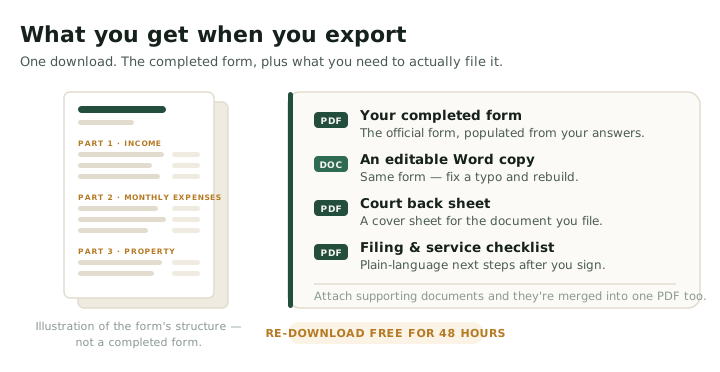
You get the completed Form F8 or Form 4 — a PDF plus an editable Word copy, filled from your answers — to review, swear and file, plus a list of the judgment calls worth a lawyer's eye.
Which one are you building?
Which form you file depends on which court your case is in — Provincial Court uses Form 4, Supreme Court uses Form F8. They are separate forms under separate rules and are not interchangeable. Repmyself.ca builds either; you choose when you start.
Not sure which applies to you? Form 4 or Form F8 — the full comparison →
Supreme Court — Form F8
Supreme Court Family Rules
Use Form F8 when your case is in Supreme Court. It is the longer of the two, covering the full property picture including excluded property and pensions.
- Part 1Income from every source (Guideline income)
- Part 2Monthly living expenses
- Part 3Property & debt — everything you own and owe
- Part 4Special & extraordinary expenses for children (s. 7)
- Part 5Undue hardship, if it applies
- Part 6Income of other persons in your household
Provincial Court — Form 4
Provincial Court Family Rules (rules 3, 25, 28 & 172)
Use Form 4 when your case is in Provincial Court. It is the shorter of the two — Provincial Court does not divide property and debt.
- Part 1Income & benefits (annual income summary)
- Part 2Personal expenses & debts
- Part 3Assets
- Part 4Special & extraordinary expenses for children (s. 7)
- Part 5Income of other persons in your household
- Part 6Undue hardship, if it applies
Either way, you'll usually need your recent tax returns, Notices of Assessment, pay stubs, and account and debt statements to fill it out accurately — the two forms have different document lists. The form is straightforward once your figures are organized — that's the part this tool does.
Where a tool ends and a lawyer begins.
Repmyself.ca is honest about its lane. It organizes your numbers and points out the questions that need judgment — your Guideline income when you're self-employed, whether an asset is excluded property, imputation, how children's expenses get split. It won't answer those for you, because getting them wrong is expensive. Before you file, it's worth having your completed Form F8 or Form 4 reviewed by a BC family lawyer — a second set of expert eyes on exactly those judgment calls, so a costly mistake doesn't reach the registry.
Simple pricing
A financial statement is a 3–6 hour job, depending on complexity — the kind of time you’d otherwise pay a lawyer’s hourly rate to do. Repmyself does it for a flat one-time fee: build and preview free, pay only when you export.
Answer the plain-language questions, upload statements, and see your income, expenses and net worth totalled by category on screen. No account, no card.
The completed Form 4 — a PDF plus an editable Word copy, populated from your answers. Re-download free for 48 hours if you spot a typo.
Build Form 4The completed Form F8 — a PDF plus an editable Word copy, populated from your answers. Re-download free for 48 hours if you spot a typo.
Build Form F8One form, one flat fee — no subscription. Launch pricing for a limited time. Want a lawyer to check it before you file? Have your statement reviewed.
Questions people actually ask.
Is Repmyself.ca legal advice?
No. It provides legal information and helps you organize your figures. Using it does not make Repmyself.ca your lawyer. For advice about your specific situation, speak with a lawyer — and we recommend having your completed form reviewed by a lawyer before you file.
Form F8 or Form 4 — which one do I need?
It depends on which court your case is in, not what it's about. A case in the Supreme Court uses Form F8; a case in the Provincial Court uses Form 4. Repmyself.ca builds either; you pick when you start. For the side-by-side — the rules behind each form, which parts you complete, the two different supporting-document lists and when each is due — see Form 4 or Form F8: which financial statement do you need?
Do I have to file a Financial Statement?
Financial Statements are commonly required when a case involves child support, spousal support, or claims about property and debt — a Form F8 in Supreme Court or a Form 4 in Provincial Court. They are not automatically required merely because parenting arrangements are disputed. Exactly when one is required, and by when, depends on the court, the claims and the applicable Family Rules. If you're unsure, check the rules or ask a lawyer.
Is my financial information stored anywhere?
No. Your figures live only in your browser as you work — we keep nothing on our servers. Your numbers are sent to us only for the moment it takes to build your document, then discarded. If you upload a bank statement, it is read on our server to pull the balances, is never sent to any third party, and is destroyed within seconds. You can also wipe everything instantly with the “Delete everything now” button, and it auto-deletes on its own.
Does this replace the official court form?
The free preview shows your figures totalled by category so you can check the big picture. When you're ready, Repmyself.ca produces the completed official Form F8 or Form 4 — a PDF plus an editable Word copy, populated from your answers — for you to review, swear and file.
I'm self-employed — will it calculate my child support income?
It totals what you enter, but your Guideline income for support can differ from that total, especially with self-employment or a corporation. The tool flags this rather than guessing, and it's a good thing to have reviewed.
What documents should I gather before I start?
It helps to have your recent financial records on hand. Depending on the form and your situation, that can include your income tax returns and Notices of Assessment (Form F8 commonly asks for the last three years), recent pay stubs or other proof of income, EI, workers' compensation or income-assistance statements, business or corporate financial statements if you're self-employed, bank and investment statements, property assessment information, mortgage, loan and credit-card statements, and records of children's expenses. You can start without everything and come back — but the closer your figures are to your documents, the better. The current forms and instructions are on the Province's site: Form F8 and Form 4.
Where do I find my court file number and registry?
They usually appear near the top of any document already filed in your case — look for Court File Number (or "Court File No."), and Registry / Registry Location. Enter them exactly as they appear on your filed documents. If no case has been started yet, you may not have a file number — you can still build your statement; the tool doesn't decide when or how you start a case. If you're unsure, contact the court registry or ask a lawyer.
How does Repmyself calculate annual and monthly amounts?
It totals the figures you enter and keeps them on the basis the form needs — income as annual amounts, expenses as monthly — with totals updating as you work. For employment income you can enter your pay at its frequency (weekly, every two weeks, twice a month, or monthly) and Repmyself annualizes it. These calculations only organize the numbers you give — they don't decide whether an amount counts as income, an allowable expense, or a particular type of property or debt. Those are judgment calls the tool flags rather than answers.
Can I enter an estimate and change it later?
Yes — you can review and change any entry while you build your statement and before you export the final version. Where you can, use figures backed by your records rather than guesses, and check each answer against your documents before you file. Your Financial Statement is a sworn document, so if you're unsure what must be disclosed or how a figure should be shown, check the official instructions or get independent legal advice.
New to financial statements?
Start with the plain-language guide: What is a financial statement in BC family law?
Where each form sits in the case: How a Supreme Court family case starts · How a Provincial Court family case starts
Provincial Court application and reply: Application About a Family Law Matter (Form 3) · Reply (Form 6)